

Documentation Index
Fetch the complete documentation index at: https://docs.formance.com/llms.txt
Use this file to discover all available pages before exploring further.
Definition
The ledger supports bi-temporality, which means that each transaction is associated with two timestamps:- Request time: The time at which the transaction was submitted to the ledger. It is usually the machine clock time.
- Transaction time: The time at which the transaction is considered to have occurred.
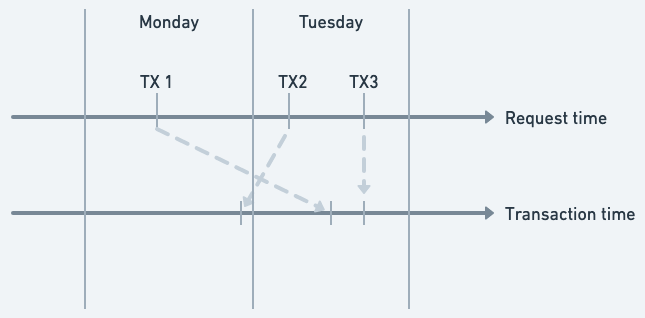
TX1is submitted on monday, but the transaction time is set to tuesday. The transaction is considered to have occurred on tuesday. We say that the transaction is postdated.TX2is submitted on tuesday, and the transaction time is set to monday. The transaction is considered to have occurred on monday. We say that the transaction is backdated.TX3is submitted on tuesday, and the transaction time is set to tuesday. The transaction is considered to have occurred on tuesday. This is the default behavior.
- Time travel: The ability to query the ledger as it was at a specific point in time.
- Correction of errors: The ability to correct errors in the ledger by backdating or postdating transactions.
- Auditing: The ability to audit the ledger at a specific point in time.
- Data import: The ability to import data from external systems that use different timestamps.
Present time relativity
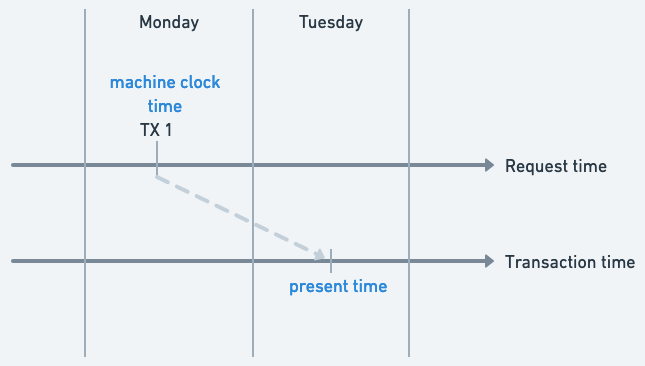
Because transactions can either be backdated or postdated, the concept of “present time” may not match the current machine clock time. From the point of view of the ledger, the present time is the transaction timestamp the most in the future. In the example above, let’s consider that we only insertedTX1. In that case, the machine clock is on monday, but the present time is tuesday because the transaction time of TX1 is tuesday and it is the most recent transaction.
Implications of bi-temporality
Bi-temporality allows users to insert transaction at any point in time in the past or future. When a user performs a query on the ledger, the ledger state is determined based on the requested point in time. The ledger state is a snapshot of the ledger at the requested point in time, and it includes all transactions that have a transaction time equal to or less than the requested point in time. This capability has some implications discussed below.From now on, we will only consider the transaction time when discussing the ledger state at a specific point in time.
Account and Transaction Metadata
Account and transaction metadata are not fixed in time. When a user queries the ledger at a specific point in time, the metadata associated with accounts and transactions is also determined based on the requested point in time. This means that the metadata associated with an account or transaction can change over time.Example: Fraud management
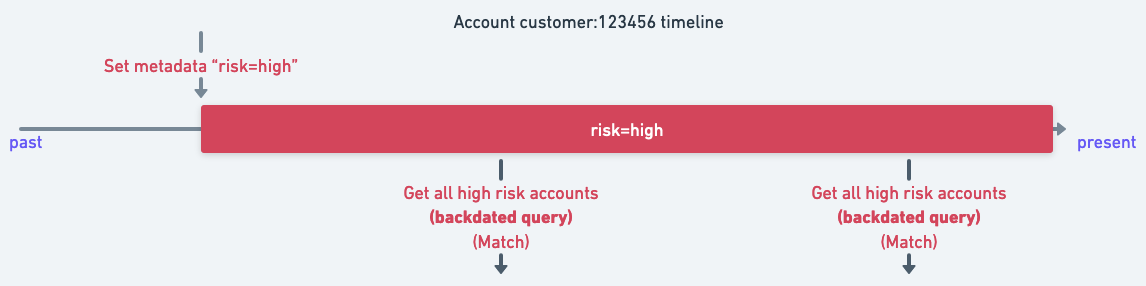
Let’s consider the following example. Suppose that a fraud engine is integrated with the ledger to flag suspicious account. It does so by addingrisk=high to the account metadata. The fraud team regularly exports the suspicious accounts to an external system for further investigation. The fraud team queries the ledger at specific points in time to get the list of suspicious accounts.
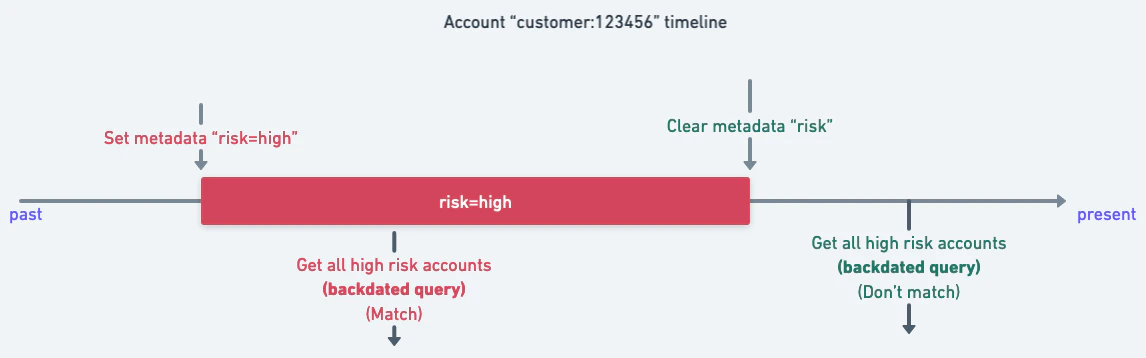
Let’s consider the account customer:123456. At a time t1 the fraud engine marks the account as suspicious by adding risk=high to the account metadata. The fraud team exports the list of suspicious accounts at time t2 and t3. The account will be included in the list of suspicious accounts in both exports.
risk=high metadata from the account at time t4 located between the two exports t2 and t3. It does so by removing the risk metadata using a backdated transaction. In this case, the account will not be included in the list of suspicious accounts in the export at time t3.
Backdated transaction validation
Problem Statement
When a user inserts a transaction with a transaction time in the past, there is a risk that the transaction is invalid because it might yield an invalid state of the ledger. Consider the following example account whose balance evolution is as follows:| Time | Transaction amount | New Balance |
|---|---|---|
| 1 | 100 | 100 |
| 2 | -50 | 50 |
| 3 | -10 | 40 |
| 4 | 50 | 90 |
| 5 | -10 | 80 |
-100. This transaction would yield the following balance evolution:
| Time | Transaction amount | New Balance |
|---|---|---|
| 1 | 100 | 100 |
| 2 | -100 | 0 |
| 3 | -50 | -50 |
| 4 | -10 | -60 |
| 5 | 50 | -10 |
| 6 | -10 | -20 |
-20, which is invalid because the account has a negative balance. This is an example of an invalid backdated transaction.
Now, consider that a user wants to insert a backdated transaction with a transaction time of 2 and an amount of -50, rather than -100. This transaction would yield the following balance evolution:
| Time | Transaction amount | New Balance |
|---|---|---|
| 1 | 100 | 100 |
| 2 | -50 | 50 |
| 3 | -50 | 0 |
| 4 | -10 | -10 |
| 5 | 50 | 40 |
| 6 | -10 | 30 |
30, which is valid because the account has a positive balance. This is an example of a valid backdated transaction.
Validation Mechanism
The ledger does not validate backdated transactions the same way it validates usual transactions. To check that a backdated transaction is valid, the ledger computes the new current state of the ledger by applying the backdated transaction and all the transactions that occurred after the backdated transaction. If the new state is valid, the backdated transaction is accepted. Otherwise, the backdated transaction is rejected. A backdated transaction is considered valid if it doesn’t put any account in a negative balance in the new computed final state of the ledger. Keep in mind that the ledger does not validate the intermediate states of the ledger, only the final state. The only exception to this rule is the accounts that have been allowed to overdraft within the transaction. These accounts can have a negative balance in the new computed final state of the ledger.Setting transaction timestamps
When creating transactions, you can specify a custom timestamp to backdate or postdate the transaction.Using the API
When sending a transaction via the API, include thetimestamp field in the request body:
Using fctl
For manual transactions or maintenance tasks, use the--timestamp flag with the fctl command:
Currently, it’s not possible to set the transaction timestamp directly within a Numscript. While you can set transaction metadata using
set_tx_meta(key, value), there’s no equivalent function for setting the timestamp in the script itself.Reverting transactions
Transaction reverts are used to correct errors by reversing the effects of a previously committed transaction. To revert a transaction, use the revert endpoint:The atEffectiveDate parameter
TheatEffectiveDate parameter controls the transaction time of the compensatory transaction:
For example, consider an account with transactions 1, 2, and 3. If you revert transaction 2 without atEffectiveDate, the compensatory transaction is created at the current time (after transaction 3). When generating reports that filter out reverted transactions, transaction 3 will show an incorrect balance of -9250 instead of -9750 because the revert isn’t accounted for at the right point in time.
With atEffectiveDate=true, the compensatory transaction is created with the same transaction time as the original, maintaining accurate historical balances:
| TxId | Amount In | Amount Out | Balance |
|---|---|---|---|
| 1 | 0 | 10000 | -10000 |
| 2 | 500 | 0 | -9500 |
| 4 | 0 | 500 | -10000 |
| 3 | 250 | 0 | -9750 |
Force reverting transactions
By default, the system prevents reverting transactions that would result in insufficient funds. However, you can override this validation using theforce parameter.
To revert a transaction involving an account with a negative balance:
Querying transactions with reverts
When querying transactions, you may want to exclude both reverted transactions and their compensatory transactions. Use this filter:- Matches transactions for a specific account
- Excludes transactions marked as reverted
- Excludes compensatory transactions (identified by the
com.formance.spec/state/revertsmetadata)
Effective Volumes
In Ledger v2, the concept of effective volumes was introduced to handle backdated transactions correctly.What are effective volumes?
- Regular volumes: Represent volumes as they are at the current time
- Effective volumes: Represent volumes as they were at the date a transaction was inserted, not the date it was created
Effective volumes are the only data that escapes the control of historization. Even by freezing the ledger at a date T, effective volumes can move because you can insert transactions before that date.
Enabling effective volumes
Effective volumes are enabled when the following features are configured:| Feature | Value | Description |
|---|---|---|
MOVES_HISTORY | ON | Historize funds movements by account |
MOVES_HISTORY_POST_COMMIT_EFFECTIVE_VOLUMES | SYNC | Compute and maintain post-commit effective volumes |
Performance considerations
When inserting a backdated transaction withMOVES_HISTORY_POST_COMMIT_EFFECTIVE_VOLUMES enabled, the ledger performs these additional steps:
- Compute postCommitEffectiveVolumes for the moves by searching for previous moves for the account/asset pair
- Insert the new move
- Update postCommitEffectiveVolumes for all future moves
Volume Query Consistency
If you experience flaky tests or consistency issues when posting transactions and immediately querying volumes, this may be related to how Point In Time (PIT) calculations work.Understanding the issue
In Ledger versions 2.0 and 2.1, when no explicit end time (PIT) is provided in volume queries, the system automatically calculates one based on the current wall clock time (time.Now()). This causes issues when:
- Writing transactions with future timestamps
- The query executes before those future transactions become “past” relative to the auto-calculated end time
- Tests run quickly enough that timing becomes inconsistent
Solutions
Upgrade to Ledger 2.2+ (Recommended)
Starting from version 2.2, the end time (PIT) is not automatically defined, eliminating this timing issue.Specify an explicit end time
If using an older version, provide an explicitendTime in your volume queries:
Adjust transaction timestamps
Use past timestamps instead of future ones in your tests, ensuring all transactions are in the past relative to the query time.Data consistency guarantee
Formance Ledger provides immediate consistency for all write operations. The system relies on PostgreSQL’s ACID properties to ensure data is completely synchronized after writing.The ledger stores dates with microsecond precision (PostgreSQL’s maximum precision). To avoid potential flakiness in tests, consider rounding your dates to microsecond precision.