# Banking Bridge API
Source: https://docs.formance.com/banking-bridge-api
Stack: v3.2
The Banking Bridge API lets your own systems work with [Banking Bridge](https://docs.formance.com/modules/banking-bridge) without going through the console. By generating OAuth2 clients you can easily grant your applications the ability to poll data about bank accounts you've connected.
## Base URL
```bash
export BANKING_BRIDGE_API_URL="https://banking-bridge.formance.cloud/api/v1"
```
## Connector clients
A connector client belongs to **one channel**. Every route on this page automatically reads or acts on the channel affiliated with your client credentials at creation time.
### Generating client credentials
Create a connector client in the Banking Bridge console. You will need a role that can manage API access for the channel.
1. Open the channel the client should read or act on.
2. Select **API Access** in the channel's sidebar. The page lists the channel's existing access keys.
3. Click **Create Access Key**, give the key a name, and choose its [scopes](#scopes).
4. Copy the client ID and secret. The secret is only returned when the key is created, so store it somewhere safe straight away.
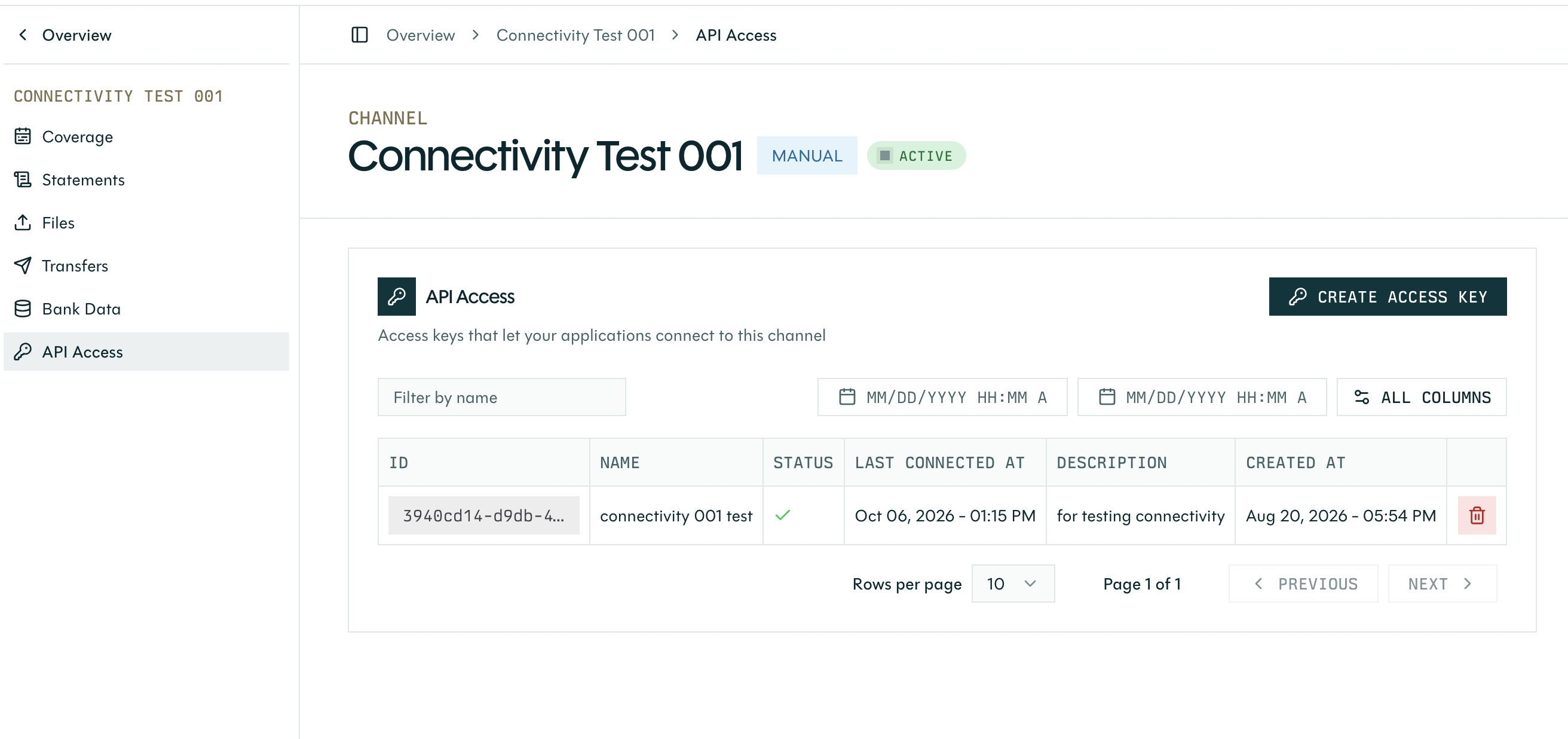
To revoke the credentials, delete the access key with the delete button at the end of its row.
### Scopes
Choose the client's scopes when you create it. A client created with no scopes gets `bankingbridge:ReadBankStatement` which can be used to read accounts, balances and transactions of connected bank accounts. Scopes can't be changed afterwards: create a new client instead.
We recommend adhering to the Principle of Least Privilege (PoLP) by granting only the scopes that your application actually needs.
**All channels**
| Scope | Lets your app |
| --------------------------------- | --------------------------------------------------------------------------------------------------------------------------------------------------------------------------------- |
| `bankingbridge:ReadBankStatement` | Fetch data derived from bank statements such as accounts, balances and transactions. On Direct Banking channels you can also fetch data about the CAMT.053 statements themselves. |
**Direct Banking channels**
| Scope | Lets your app |
| ------------------------------------------ | -------------------------------------------------------------------------------------- |
| `bankingbridge:ReadBankStatementFile` | List ingested files that Banking Bridge received from the bank (such as CAMT.053). |
| `bankingbridge:DownloadBankStatementFile` | Download ingested files that Banking Bridge received from the bank (such as CAMT.053). |
| `bankingbridge:ReadSubmission` | List generated files that Banking Bridge sent to the bank (such as PAIN.001). |
| `bankingbridge:DownloadBankSubmissionFile` | Download generated files that Banking Bridge sent to the bank (such as PAIN.001). |
| `bankingbridge:UploadFile` | Directly upload ISO20022 files you wish to ingest. |
| `bankingbridge:ReadUploadedFile` | Get info on the processing status of files that were directly uploaded. |
**Open Banking channels**
| Scope | Lets your app |
| ------------------------------------------ | ----------------------------------------------------------------------- |
| `bankingbridge:ReadOpenBankingConnection` | View the status of Open Banking connections. |
| `bankingbridge:WriteOpenBankingConnection` | Create, reconnect and delete connections with Open Banking aggregators. |
### Get an access token
Exchange client id and secret you created earlier for a bearer token with the OAuth2 client credentials grant. The `resource` parameter names Banking Bridge (`app://bbs`) followed by the scopes you want in the token, separated by spaces.
```bash
export BANKING_BRIDGE_TOKEN=$(curl -s -X POST "https://app.formance.cloud/api/oauth/token" \
-d "grant_type=client_credentials" \
-d "client_id=$CLIENT_ID" \
-d "client_secret=$CLIENT_SECRET" \
--data-urlencode "resource=app://bbs|bankingbridge:ReadBankStatement" \
| jq -r .access_token)
```
### Making your first authenticated request
Send the token obtained above as a bearer token on every request to the API:
```bash
curl -H "Authorization: Bearer $BANKING_BRIDGE_TOKEN" \
"$BANKING_BRIDGE_API_URL/connectors/accounts?pageSize=100"
```
## Pagination
List endpoints return a page of results in a cursor:
```json
{
"cursor": {
"pageSize": 100,
"hasMore": true,
"next": "eyJvZmZzZXQiOjEwMCwi...",
"data": []
}
}
```
Set `pageSize` on the first request. While `hasMore` is `true`, pass the `next` value as `cursor` to get the following page. When `cursor` is set, every other query parameter is ignored: the cursor already carries the original filters and page size.
[Postings](#bank-data-listConnectorPostings) work differently, because they are meant to be polled. Every page returns a `next` cursor, including the last page and empty pages. Store it and pass it back later to get only the postings stored since then. When `hasMore` is `false`, wait before resuming from `next`.
## Filtering
Most list endpoints take a `query` parameter: a URL-encoded JSON filter. For example, to fetch only the postings imported after a point in time:
```bash
curl -G -H "Authorization: Bearer $BANKING_BRIDGE_TOKEN" \
"$BANKING_BRIDGE_API_URL/connectors/postings" \
--data-urlencode 'query={"$gt": {"importedAt": "2026-01-01T00:00:00Z"}}'
```
On postings, the field you can filter on is `importedAt`, with `$match`, `$gt`, `$gte`, `$lt` or `$lte`.
### Syncing new data
Paginating and syncing are two different jobs. A cursor walks through one result set; syncing means coming back later for what changed since.
**Postings** are built to be synced from a cursor:
1. On your first sync, list postings, optionally with an `importedAt` filter to choose where to start, and walk every page.
2. Store the `next` cursor of the last page, even when that page is empty.
3. On each later sync, resume from the stored cursor. You receive only the postings stored since.
A posting that changes after it was stored keeps its position, so resuming from a cursor doesn't return it again. Its `lastUpdatedAt` is set when it changes. To pick up changes, and the rare posting that a cursor can miss (see [Bank data](#bank-data-for-all-channels)), periodically re-read from an older cursor and compare by `id`.
**Latest balances** are a snapshot, not a feed: walk every page from the start on each pass, and don't keep the cursor between passes.
## Errors
Failed requests return a JSON body with a machine-readable code and a message:
```json
{
"errorCode": "VALIDATION",
"errorMessage": "this resource already exists"
}
```
## Routes by channel type
A channel is either a **Direct Banking** channel, which exchanges ISO 20022 files with the bank, or an **Open Banking** channel, which fetches bank data through one of our open banking aggregator partners.
| Prefix | Serves | Covers |
| ----------------------------- | --------------------------------------- | ---------------------------------------------------------------------- |
| `/connectors/` | Every channel | [Bank data](#bank-data-for-all-channels): latest balances and postings |
| `/connectors/direct-banking/` | Direct Banking channels (EBICS, Manual) | [Statements, bank files and uploads](#for-direct-banking-channels) |
| `/connectors/open-banking/` | Open Banking channels | [Users and connections](#for-open-banking-channels) |
The [endpoint reference](#endpoints) is grouped the same way.
## Bank data (for all channels)
Two routes serve bank data on every channel type: the [latest balances of every account](#bank-data-listConnectorAccountBalances) and [postings](#bank-data-listConnectorPostings). On a Direct Banking channel, the data is read from the bank's statement files. On an Open Banking channel, it is synced from our partner Open Banking aggregator.
The latest balances give the current position of every account in one pass. Each account comes with its most recent balances, and an account with no balance yet is listed with an empty `balances` list. On a Direct Banking channel, the balances come from the statement whose coverage period ends latest. On an Open Banking channel, they are the balances on the most recent balance date.
Postings are returned oldest first and appear after a short settling delay (two minutes by default). This lets postings stored at the same time become visible in order. Rarely, a posting can take longer than that delay to store, and a cursor that has already moved past its position will miss it. If you need every posting, periodically re-read from an older cursor and deduplicate by `id`. Cursors issued by releases before this ordering was introduced are rejected: list again without a cursor.
### Identifying accounts
Balances and postings name their account by `accountReference`. This is the key the source files the account under: the account ID on the bank statement for Direct Banking, and the provider's own account ID for Open Banking. On an Open Banking channel, the reference changes when the connection is re-linked, so the same bank account can come back under a new reference.
### Pending and posted entries
Open Banking providers report a settled payment as a new entry rather than updating the pending one. Banking Bridge keeps both, so both appear in postings. The posted entry's `linkedReference` holds the pending entry's `entryReference`:
```json
[
{ "id": "…", "entryReference": "txn-pending-81", "amountInMinors": 4200 },
{ "id": "…", "entryReference": "txn-posted-93", "amountInMinors": 4200, "linkedReference": "txn-pending-81" }
]
```
Both entries describe the same payment. To avoid counting it twice, skip any entry whose `entryReference` is named in another entry's `linkedReference`.
## For Direct Banking channels
These routes serve EBICS and Manual channels.
### Statements and bank files
[Statements](#direct-banking-listConnectorStatements) are the account statements Banking Bridge has imported from official CAMT.053 statement files.
- **Incoming files** are files received from the bank, or uploaded, once Banking Bridge has processed them, successfully or not. [Download one](#direct-banking-downloadConnectorIncomingFiles) to get its original content.
- **Outgoing files** are files Banking Bridge generated for the channel and submitted for transmission to the bank. [Download one](#direct-banking-downloadConnectorOutgoingFiles) to get the file as it was generated.
### Uploading CAMT.053 files
To send CAMT.053 statement files to the channel yourself, [upload them](#direct-banking-uploadConnectorFiles) as a multipart form, one `file` field per file, up to 10 at a time.
```bash
curl -H "Authorization: Bearer $BANKING_BRIDGE_TOKEN" \
-F "file=@statement-2026-03-01.xml" \
-F "file=@statement-2026-03-02.xml" \
"$BANKING_BRIDGE_API_URL/connectors/direct-banking/files/upload/camt053"
```
The response reports each file separately, with `status` `OK` or `ERROR`, so check every entry rather than only the HTTP status. An accepted file is queued for processing: [get it by its `id`](#direct-banking-getConnectorFile) to follow it using the incoming file endpoint.
## For Open Banking channels
Setup connections to new bank accounts by acquiring a consent link URL, which allows you to login to your bank and connect Banking-Bridge directly.
To connect a bank from your own product, [create an Open Banking user](#open-banking-createConnectorOpenBankingUser) with the bank's country and an `idempotencyKey`. Clicking through the consent flow provided by the `linkUrl` on one of our Open Banking providers will grant Banking Bridge read access to your bank account.
The flow involves three objects, each with its own ID:
- **User** (`openBankingUserId`): your end user's identity at the aggregator. It stays the same across every link and reconnect made for them.
- **Attempt** (`openBankingConnectionAttemptId`): one run of the consent flow. Its `status` is `pending`, then `completed` or `exited`.
- **Connection**: the access to a bank created when an attempt completes. Its `openBankingConnectionAttemptId` names the attempt that last established it.
Creating a user returns `202 Accepted` with the user's first attempt, not with a connection:
```bash
curl -X POST -H "Authorization: Bearer $BANKING_BRIDGE_TOKEN" \
-H "Content-Type: application/json" \
"$BANKING_BRIDGE_API_URL/connectors/open-banking/users" \
-d '{
"countryCode": "FR",
"idempotencyKey": "6f8f1c9e-6e5c-4b8a-9e2a-6a1e2b6c9f3d",
"clientRedirectUrl": "https://app.example.com/banking/callback"
}'
```
1. Send your end user to the attempt's `linkUrl` to complete the consent flow with their bank.
2. When they finish or abandon the flow, the aggregator redirects them to your `clientRedirectUrl`.
3. Once the connection is established, Banking Bridge syncs its accounts. They appear in the [latest balances of every account](#bank-data-listConnectorAccountBalances).
If the create request fails or times out, retry it with the same `idempotencyKey`. A repeated request with the same key returns the attempt that was already created, rather than starting a new one.
When a connection is `pending_disconnection`, `disconnected` or in `error`, [reconnect it](#open-banking-reconnectConnectorOpenBankingConnection) to start a new consent flow.
## Endpoints
### GET /connectors/open-banking/connections/{openBankingConnectionId}
Get an open banking connection
Get an open banking connection on the connector client's channel.
```json
{
"method": "GET",
"path": "/connectors/open-banking/connections/{openBankingConnectionId}",
"summary": "Get an open banking connection",
"description": "Get an open banking connection on the connector client's channel.",
"tags": [],
"module": "Open Banking",
"resourceGroup": "Connections",
"responses": [
{
"code": "200",
"description": "OK",
"mediaType": "application/json",
"schema": {
"type": "object",
"properties": [
{
"name": "data",
"type": "OpenBankingConnectionDetails",
"required": true
}
]
}
},
{
"code": "400",
"description": "Bad request. `errorCode` is `WRONG_CHANNEL_TYPE` when the connector client's channel is not an `OPEN_BANKING` channel: the /connectors/open-banking routes are not available on `MANUAL` or `EBICS` channels.",
"mediaType": "application/json",
"schema": {
"type": "object",
"ref": "BankingBridgeErrorResponse",
"properties": [
{
"name": "errorCode",
"type": "string",
"required": true,
"example": "VALIDATION"
},
{
"name": "errorMessage",
"type": "string",
"required": true,
"example": "this resource already exists"
}
]
}
}
]
}
```
### DELETE /connectors/open-banking/connections/{openBankingConnectionId}
Delete an open banking connection
Delete an open banking connection on the connector client's channel, which also stops it at the aggregator.
```json
{
"method": "DELETE",
"path": "/connectors/open-banking/connections/{openBankingConnectionId}",
"summary": "Delete an open banking connection",
"description": "Delete an open banking connection on the connector client's channel, which also stops it at the aggregator.",
"tags": [],
"module": "Open Banking",
"resourceGroup": "Connections",
"responses": [
{
"code": "204",
"description": "No content"
},
{
"code": "default",
"description": "Error",
"mediaType": "application/json",
"schema": {
"type": "object",
"ref": "BankingBridgeErrorResponse",
"properties": [
{
"name": "errorCode",
"type": "string",
"required": true,
"example": "VALIDATION"
},
{
"name": "errorMessage",
"type": "string",
"required": true,
"example": "this resource already exists"
}
]
}
},
{
"code": "400",
"description": "Bad request. `errorCode` is `WRONG_CHANNEL_TYPE` when the connector client's channel is not an `OPEN_BANKING` channel: the /connectors/open-banking routes are not available on `MANUAL` or `EBICS` channels.",
"mediaType": "application/json",
"schema": {
"type": "object",
"ref": "BankingBridgeErrorResponse",
"properties": [
{
"name": "errorCode",
"type": "string",
"required": true,
"example": "VALIDATION"
},
{
"name": "errorMessage",
"type": "string",
"required": true,
"example": "this resource already exists"
}
]
}
}
]
}
```
### POST /connectors/open-banking/connections/{openBankingConnectionId}/reconnect
Reconnect an open banking connection
Start a new link attempt for an open banking connection on the connector client's channel, for example when it is pending\_disconnection, disconnected or in error.
```json
{
"method": "POST",
"path": "/connectors/open-banking/connections/{openBankingConnectionId}/reconnect",
"summary": "Reconnect an open banking connection",
"description": "Start a new link attempt for an open banking connection on the connector client's channel, for example when it is pending_disconnection, disconnected or in error.",
"tags": [],
"module": "Open Banking",
"resourceGroup": "Connections",
"requestBody": {
"mediaType": "application/json",
"required": true,
"schema": {
"type": "object",
"ref": "OpenBankingConnectionReconnectRequest",
"properties": [
{
"name": "idempotencyKey",
"type": "string",
"description": "a caller-generated key that makes this call safe to retry - a repeated call with the same key for the same connection returns the previously created attempt instead of creating a new one or calling the aggregator again",
"required": true,
"example": "0b6f7e0e-3c2d-4d8a-9a51-2f7c2b1c9e4a"
},
{
"name": "clientRedirectUrl",
"type": "string",
"description": "URL the aggregator should redirect the end user's browser to once they finish (or abandon) the reconnect flow. Optional - defaults to this service's own public base URL when omitted.",
"example": "https://app.example.com/banking/callback"
}
]
}
},
"responses": [
{
"code": "202",
"description": "Accepted",
"mediaType": "application/json",
"schema": {
"type": "object",
"properties": [
{
"name": "data",
"type": "OpenBankingConnectionAttempt",
"required": true
}
]
}
},
{
"code": "400",
"description": "Bad request. `errorCode` is `WRONG_CHANNEL_TYPE` when the connector client's channel is not an `OPEN_BANKING` channel: the /connectors/open-banking routes are not available on `MANUAL` or `EBICS` channels.",
"mediaType": "application/json",
"schema": {
"type": "object",
"ref": "BankingBridgeErrorResponse",
"properties": [
{
"name": "errorCode",
"type": "string",
"required": true,
"example": "VALIDATION"
},
{
"name": "errorMessage",
"type": "string",
"required": true,
"example": "this resource already exists"
}
]
}
},
{
"code": "409",
"description": "Error",
"mediaType": "application/json",
"schema": {
"type": "object",
"ref": "BankingBridgeErrorResponse",
"properties": [
{
"name": "errorCode",
"type": "string",
"required": true,
"example": "VALIDATION"
},
{
"name": "errorMessage",
"type": "string",
"required": true,
"example": "this resource already exists"
}
]
}
}
]
}
```
### POST /connectors/open-banking/users
Create an open banking user
Create an open banking user on the connector client's channel. Creating a user also starts its first link attempt, which is what the response returns.
```json
{
"method": "POST",
"path": "/connectors/open-banking/users",
"summary": "Create an open banking user",
"description": "Create an open banking user on the connector client's channel. Creating a user also starts its first link attempt, which is what the response returns.",
"tags": [],
"module": "Open Banking",
"resourceGroup": "Users",
"requestBody": {
"mediaType": "application/json",
"required": true,
"schema": {
"type": "object",
"ref": "OpenBankingConnectionCreationRequest",
"properties": [
{
"name": "countryCode",
"type": "string",
"description": "ISO 3166-1 alpha-2 country code of the bank to connect to",
"required": true,
"example": "FR"
},
{
"name": "idempotencyKey",
"type": "string",
"description": "a caller-generated key that makes this call safe to retry - a repeated call with the same key returns the previously created attempt instead of creating a new one or calling the aggregator again",
"required": true,
"example": "6f8f1c9e-6e5c-4b8a-9e2a-6a1e2b6c9f3d"
},
{
"name": "clientRedirectUrl",
"type": "string",
"description": "URL the aggregator should redirect the end user's browser to once they finish (or abandon) the consent flow. Optional - defaults to this service's own public base URL when omitted.",
"example": "https://app.example.com/banking/callback"
}
]
}
},
"responses": [
{
"code": "202",
"description": "Accepted",
"mediaType": "application/json",
"schema": {
"type": "object",
"properties": [
{
"name": "data",
"type": "OpenBankingConnectionAttempt",
"required": true
}
]
}
},
{
"code": "400",
"description": "Bad request. `errorCode` is `WRONG_CHANNEL_TYPE` when the connector client's channel is not an `OPEN_BANKING` channel: the /connectors/open-banking routes are not available on `MANUAL` or `EBICS` channels.",
"mediaType": "application/json",
"schema": {
"type": "object",
"ref": "BankingBridgeErrorResponse",
"properties": [
{
"name": "errorCode",
"type": "string",
"required": true,
"example": "VALIDATION"
},
{
"name": "errorMessage",
"type": "string",
"required": true,
"example": "this resource already exists"
}
]
}
},
{
"code": "409",
"description": "Error",
"mediaType": "application/json",
"schema": {
"type": "object",
"ref": "BankingBridgeErrorResponse",
"properties": [
{
"name": "errorCode",
"type": "string",
"required": true,
"example": "VALIDATION"
},
{
"name": "errorMessage",
"type": "string",
"required": true,
"example": "this resource already exists"
}
]
}
}
]
}
```
### GET /connectors/open-banking/users
List open banking users
List the open banking users on the connector client's channel.
```json
{
"method": "GET",
"path": "/connectors/open-banking/users",
"summary": "List open banking users",
"description": "List the open banking users on the connector client's channel.",
"tags": [],
"module": "Open Banking",
"resourceGroup": "Users",
"responses": [
{
"code": "200",
"description": "OK",
"mediaType": "application/json",
"schema": {
"type": "object",
"properties": [
{
"name": "cursor",
"type": "OpenBankingUserCursor",
"required": true
}
]
}
},
{
"code": "400",
"description": "Bad request. `errorCode` is `WRONG_CHANNEL_TYPE` when the connector client's channel is not an `OPEN_BANKING` channel: the /connectors/open-banking routes are not available on `MANUAL` or `EBICS` channels.",
"mediaType": "application/json",
"schema": {
"type": "object",
"ref": "BankingBridgeErrorResponse",
"properties": [
{
"name": "errorCode",
"type": "string",
"required": true,
"example": "VALIDATION"
},
{
"name": "errorMessage",
"type": "string",
"required": true,
"example": "this resource already exists"
}
]
}
}
]
}
```
### GET /connectors/open-banking/users/{openBankingUserId}
Get an open banking user
Get an open banking user on the connector client's channel.
```json
{
"method": "GET",
"path": "/connectors/open-banking/users/{openBankingUserId}",
"summary": "Get an open banking user",
"description": "Get an open banking user on the connector client's channel.",
"tags": [],
"module": "Open Banking",
"resourceGroup": "Users",
"responses": [
{
"code": "200",
"description": "OK",
"mediaType": "application/json",
"schema": {
"type": "object",
"properties": [
{
"name": "data",
"type": "OpenBankingUserDetails",
"required": true
}
]
}
},
{
"code": "400",
"description": "Bad request. `errorCode` is `WRONG_CHANNEL_TYPE` when the connector client's channel is not an `OPEN_BANKING` channel: the /connectors/open-banking routes are not available on `MANUAL` or `EBICS` channels.",
"mediaType": "application/json",
"schema": {
"type": "object",
"ref": "BankingBridgeErrorResponse",
"properties": [
{
"name": "errorCode",
"type": "string",
"required": true,
"example": "VALIDATION"
},
{
"name": "errorMessage",
"type": "string",
"required": true,
"example": "this resource already exists"
}
]
}
},
{
"code": "404",
"description": "Error",
"mediaType": "application/json",
"schema": {
"type": "object",
"ref": "BankingBridgeErrorResponse",
"properties": [
{
"name": "errorCode",
"type": "string",
"required": true,
"example": "VALIDATION"
},
{
"name": "errorMessage",
"type": "string",
"required": true,
"example": "this resource already exists"
}
]
}
}
]
}
```
### GET /connectors/account-balances
List the latest balances of every account for a connector
List every account on the authenticated connector client's channel,
each with its latest balances. Accounts with no balance yet are listed
with an empty `balances` list.
Pages over accounts, never splitting one account's balances across
pages, in a stable account order. Walk every page from the start on
each pass; the cursor is not meant to be kept between passes.
What "latest" means depends on the channel type:
- Open banking: every balance (one per balance type and asset) on the
account's most recent balance date. Balances re-reported during the
day are updated in place, so each call returns the current value.
- Direct banking: every balance of the account's statement whose
coverage period ends latest, with that statement's `statementId`.
Import order does not matter: a re-sent or backfilled statement for
an older period never replaces a newer one. Statements with the same
coverage end are ordered by electronic sequence number, then
creation date time.
```json
{
"method": "GET",
"path": "/connectors/account-balances",
"summary": "List the latest balances of every account for a connector",
"description": "List every account on the authenticated connector client's channel,\neach with its latest balances. Accounts with no balance yet are listed\nwith an empty `balances` list.\n\nPages over accounts, never splitting one account's balances across\npages, in a stable account order. Walk every page from the start on\neach pass; the cursor is not meant to be kept between passes.\n\nWhat \"latest\" means depends on the channel type:\n- Open banking: every balance (one per balance type and asset) on the\n account's most recent balance date. Balances re-reported during the\n day are updated in place, so each call returns the current value.\n- Direct banking: every balance of the account's statement whose\n coverage period ends latest, with that statement's `statementId`.\n Import order does not matter: a re-sent or backfilled statement for\n an older period never replaces a newer one. Statements with the same\n coverage end are ordered by electronic sequence number, then\n creation date time.\n",
"tags": [],
"module": "Bank Data",
"responses": [
{
"code": "200",
"description": "OK",
"mediaType": "application/json",
"schema": {
"type": "object",
"properties": [
{
"name": "cursor",
"type": "ConnectorAccountBalancesCursor",
"required": true
}
]
}
}
]
}
```
### GET /connectors/postings
List postings for a connector
List resolved postings for the authenticated connector client, expanding transaction details into individual posting records.
Postings are returned in the order Banking Bridge stored them, oldest first.
A posting is listed only after a settling delay (two minutes by default), which gives postings stored at the same time a chance to become visible in order, so that resuming from a cursor does not skip them.
This is a bounded guarantee, not an absolute one: a posting whose storage takes longer than the settling delay to complete can still be missed by a cursor that has already moved past it.
Clients that need completeness should periodically re-read from an older cursor and deduplicate postings by `id`.
Every page returns a `next` cursor, the last and empty ones included: store it and pass it back later to receive only the postings stored since.
`hasMore` is true when more postings are available now; when it is false, wait before resuming from `next`.
A posting updated after it was stored keeps its position, so it is not returned again.
Cursors issued before this ordering was introduced are rejected with a validation error; list again without a cursor.
```json
{
"method": "GET",
"path": "/connectors/postings",
"summary": "List postings for a connector",
"description": "List resolved postings for the authenticated connector client, expanding transaction details into individual posting records.\nPostings are returned in the order Banking Bridge stored them, oldest first.\nA posting is listed only after a settling delay (two minutes by default), which gives postings stored at the same time a chance to become visible in order, so that resuming from a cursor does not skip them.\nThis is a bounded guarantee, not an absolute one: a posting whose storage takes longer than the settling delay to complete can still be missed by a cursor that has already moved past it.\nClients that need completeness should periodically re-read from an older cursor and deduplicate postings by `id`.\nEvery page returns a `next` cursor, the last and empty ones included: store it and pass it back later to receive only the postings stored since.\n`hasMore` is true when more postings are available now; when it is false, wait before resuming from `next`.\nA posting updated after it was stored keeps its position, so it is not returned again.\nCursors issued before this ordering was introduced are rejected with a validation error; list again without a cursor.\n",
"tags": [],
"module": "Bank Data",
"responses": [
{
"code": "200",
"description": "OK",
"mediaType": "application/json",
"schema": {
"type": "object",
"properties": [
{
"name": "cursor",
"type": "ConnectorPostingCursor",
"required": true
}
]
}
}
]
}
```
### GET /connectors/direct-banking/statements
List statements for a connector
List the statements on the connector client's channel
```json
{
"method": "GET",
"path": "/connectors/direct-banking/statements",
"summary": "List statements for a connector",
"description": "List the statements on the connector client's channel",
"tags": [],
"module": "Direct Banking",
"resourceGroup": "Statements",
"responses": [
{
"code": "200",
"description": "OK",
"mediaType": "application/json",
"schema": {
"type": "object",
"properties": [
{
"name": "cursor",
"type": "StatementsCursor",
"required": true
}
]
}
},
{
"code": "400",
"description": "Bad request. `errorCode` is `WRONG_CHANNEL_TYPE` when the connector client's channel is not a `MANUAL` or `EBICS` channel: the /connectors/direct-banking routes are not available on `OPEN_BANKING` channels.",
"mediaType": "application/json",
"schema": {
"type": "object",
"ref": "BankingBridgeErrorResponse",
"properties": [
{
"name": "errorCode",
"type": "string",
"required": true,
"example": "VALIDATION"
},
{
"name": "errorMessage",
"type": "string",
"required": true,
"example": "this resource already exists"
}
]
}
}
]
}
```
### GET /connectors/direct-banking/statements/{statementId}
Get statement details for a connector
Get a single statement on the connector client's channel by ID
```json
{
"method": "GET",
"path": "/connectors/direct-banking/statements/{statementId}",
"summary": "Get statement details for a connector",
"description": "Get a single statement on the connector client's channel by ID",
"tags": [],
"module": "Direct Banking",
"resourceGroup": "Statements",
"responses": [
{
"code": "200",
"description": "OK",
"mediaType": "application/json",
"schema": {
"type": "object",
"properties": [
{
"name": "data",
"type": "Statement",
"required": true
}
]
}
},
{
"code": "400",
"description": "Bad request. `errorCode` is `WRONG_CHANNEL_TYPE` when the connector client's channel is not a `MANUAL` or `EBICS` channel: the /connectors/direct-banking routes are not available on `OPEN_BANKING` channels.",
"mediaType": "application/json",
"schema": {
"type": "object",
"ref": "BankingBridgeErrorResponse",
"properties": [
{
"name": "errorCode",
"type": "string",
"required": true,
"example": "VALIDATION"
},
{
"name": "errorMessage",
"type": "string",
"required": true,
"example": "this resource already exists"
}
]
}
}
]
}
```
### GET /connectors/direct-banking/files/{uploadFileId}
Get info of an uploaded file for a connector
Fetch details, including the processing status, of a file that has been uploaded to the connector client's channel
```json
{
"method": "GET",
"path": "/connectors/direct-banking/files/{uploadFileId}",
"summary": "Get info of an uploaded file for a connector",
"description": "Fetch details, including the processing status, of a file that has been uploaded to the connector client's channel",
"tags": [],
"module": "Direct Banking",
"resourceGroup": "Uploaded Files",
"responses": [
{
"code": "200",
"description": "OK",
"mediaType": "application/json",
"schema": {
"type": "object",
"properties": [
{
"name": "data",
"type": "FileUpload",
"required": true
}
]
}
},
{
"code": "400",
"description": "Bad request. `errorCode` is `WRONG_CHANNEL_TYPE` when the connector client's channel is not a `MANUAL` or `EBICS` channel: the /connectors/direct-banking routes are not available on `OPEN_BANKING` channels.",
"mediaType": "application/json",
"schema": {
"type": "object",
"ref": "BankingBridgeErrorResponse",
"properties": [
{
"name": "errorCode",
"type": "string",
"required": true,
"example": "VALIDATION"
},
{
"name": "errorMessage",
"type": "string",
"required": true,
"example": "this resource already exists"
}
]
}
}
]
}
```
### POST /connectors/direct-banking/files/upload/{fileType}
Upload a file for a connector
Upload a file of the corresponding type to the connector client's channel so it can be queued for processing
```json
{
"method": "POST",
"path": "/connectors/direct-banking/files/upload/{fileType}",
"summary": "Upload a file for a connector",
"description": "Upload a file of the corresponding type to the connector client's channel so it can be queued for processing",
"tags": [],
"module": "Direct Banking",
"resourceGroup": "Uploaded Files",
"requestBody": {
"mediaType": "multipart/form-data",
"required": true,
"schema": {
"type": "object",
"ref": "FileUploadRequest",
"properties": [
{
"name": "file",
"type": "array of string",
"required": true
}
]
}
},
"responses": [
{
"code": "200",
"description": "File upload was attempted; check data array for success or failure of individual files",
"mediaType": "application/json",
"schema": {
"type": "object",
"properties": [
{
"name": "errorCode",
"type": "string",
"description": "Only present in case there was an error that interrupted the processing of files",
"example": "INTERNAL"
},
{
"name": "errorMessage",
"type": "string",
"example": "file upload aborted due to errors"
},
{
"name": "data",
"type": "array of FileUploadStatus",
"required": true
}
]
}
},
{
"code": "400",
"description": "Bad request. `errorCode` is `WRONG_CHANNEL_TYPE` when the connector client's channel is not a `MANUAL` or `EBICS` channel: the /connectors/direct-banking routes are not available on `OPEN_BANKING` channels.",
"mediaType": "application/json",
"schema": {
"type": "object",
"ref": "BankingBridgeErrorResponse",
"properties": [
{
"name": "errorCode",
"type": "string",
"required": true,
"example": "VALIDATION"
},
{
"name": "errorMessage",
"type": "string",
"required": true,
"example": "this resource already exists"
}
]
}
},
{
"code": "413",
"description": "Error",
"mediaType": "application/json",
"schema": {
"type": "object",
"ref": "BankingBridgeErrorResponse",
"properties": [
{
"name": "errorCode",
"type": "string",
"required": true,
"example": "VALIDATION"
},
{
"name": "errorMessage",
"type": "string",
"required": true,
"example": "this resource already exists"
}
]
}
}
]
}
```
### GET /connectors/direct-banking/incoming-files
List incoming files for a connector
List the incoming files on the connector client's channel
```json
{
"method": "GET",
"path": "/connectors/direct-banking/incoming-files",
"summary": "List incoming files for a connector",
"description": "List the incoming files on the connector client's channel",
"tags": [],
"module": "Direct Banking",
"resourceGroup": "Bank Files",
"responses": [
{
"code": "200",
"description": "OK",
"mediaType": "application/json",
"schema": {
"type": "object",
"properties": [
{
"name": "cursor",
"type": "IncomingFilesCursor",
"required": true
}
]
}
},
{
"code": "400",
"description": "Bad request. `errorCode` is `WRONG_CHANNEL_TYPE` when the connector client's channel is not a `MANUAL` or `EBICS` channel: the /connectors/direct-banking routes are not available on `OPEN_BANKING` channels.",
"mediaType": "application/json",
"schema": {
"type": "object",
"ref": "BankingBridgeErrorResponse",
"properties": [
{
"name": "errorCode",
"type": "string",
"required": true,
"example": "VALIDATION"
},
{
"name": "errorMessage",
"type": "string",
"required": true,
"example": "this resource already exists"
}
]
}
}
]
}
```
### GET /connectors/direct-banking/incoming-files/{fileId}/download
Download an incoming file for a connector
Download a file on the connector client's channel that has been processed by the system (failed/successful)
```json
{
"method": "GET",
"path": "/connectors/direct-banking/incoming-files/{fileId}/download",
"summary": "Download an incoming file for a connector",
"description": "Download a file on the connector client's channel that has been processed by the system (failed/successful)",
"tags": [],
"module": "Direct Banking",
"resourceGroup": "Bank Files",
"responses": [
{
"code": "200",
"description": "File content",
"mediaType": "*/*"
},
{
"code": "400",
"description": "Bad request. `errorCode` is `WRONG_CHANNEL_TYPE` when the connector client's channel is not a `MANUAL` or `EBICS` channel: the /connectors/direct-banking routes are not available on `OPEN_BANKING` channels.",
"mediaType": "application/json",
"schema": {
"type": "object",
"ref": "BankingBridgeErrorResponse",
"properties": [
{
"name": "errorCode",
"type": "string",
"required": true,
"example": "VALIDATION"
},
{
"name": "errorMessage",
"type": "string",
"required": true,
"example": "this resource already exists"
}
]
}
}
]
}
```
### GET /connectors/direct-banking/outgoing-files
List outgoing files for a connector
List the outgoing files generated for the connector client's channel
```json
{
"method": "GET",
"path": "/connectors/direct-banking/outgoing-files",
"summary": "List outgoing files for a connector",
"description": "List the outgoing files generated for the connector client's channel",
"tags": [],
"module": "Direct Banking",
"resourceGroup": "Bank Files",
"responses": [
{
"code": "200",
"description": "OK",
"mediaType": "application/json",
"schema": {
"type": "object",
"properties": [
{
"name": "cursor",
"type": "OutgoingFilesCursor",
"required": true
}
]
}
},
{
"code": "400",
"description": "Bad request. `errorCode` is `WRONG_CHANNEL_TYPE` when the connector client's channel is not a `MANUAL` or `EBICS` channel: the /connectors/direct-banking routes are not available on `OPEN_BANKING` channels.",
"mediaType": "application/json",
"schema": {
"type": "object",
"ref": "BankingBridgeErrorResponse",
"properties": [
{
"name": "errorCode",
"type": "string",
"required": true,
"example": "VALIDATION"
},
{
"name": "errorMessage",
"type": "string",
"required": true,
"example": "this resource already exists"
}
]
}
}
]
}
```
### GET /connectors/direct-banking/outgoing-files/{fileId}/download
Download an outgoing file for a connector
Download a file that has been generated for the connector client's channel and uploaded for transmission
```json
{
"method": "GET",
"path": "/connectors/direct-banking/outgoing-files/{fileId}/download",
"summary": "Download an outgoing file for a connector",
"description": "Download a file that has been generated for the connector client's channel and uploaded for transmission",
"tags": [],
"module": "Direct Banking",
"resourceGroup": "Bank Files",
"responses": [
{
"code": "200",
"description": "File content",
"mediaType": "*/*"
},
{
"code": "400",
"description": "Bad request. `errorCode` is `WRONG_CHANNEL_TYPE` when the connector client's channel is not a `MANUAL` or `EBICS` channel: the /connectors/direct-banking routes are not available on `OPEN_BANKING` channels.",
"mediaType": "application/json",
"schema": {
"type": "object",
"ref": "BankingBridgeErrorResponse",
"properties": [
{
"name": "errorCode",
"type": "string",
"required": true,
"example": "VALIDATION"
},
{
"name": "errorMessage",
"type": "string",
"required": true,
"example": "this resource already exists"
}
]
}
}
]
}
```